
Download Iconik AI – AI-Powered Icon Design Tool for Web, iOS & Android Apps
Introducing Iconik AI: The Future of Instant Icon Design
In today’s fast-paced digital world, creating visually appealing and platform-compliant icons is essential for app developers, startups, and creative professionals. Iconik AI emerges as a revolutionary solution, combining artificial intelligence with intuitive design to deliver high-quality, customized icons in seconds. Whether you're building a mobile app for Android or iOS, launching a web application, or designing UI elements for a brand, Iconik AI simplifies the process without requiring any design expertise. The tool leverages advanced machine learning algorithms to interpret user input—such as keywords, themes, and style preferences—and generates unique, professional-grade icons tailored to your needs.
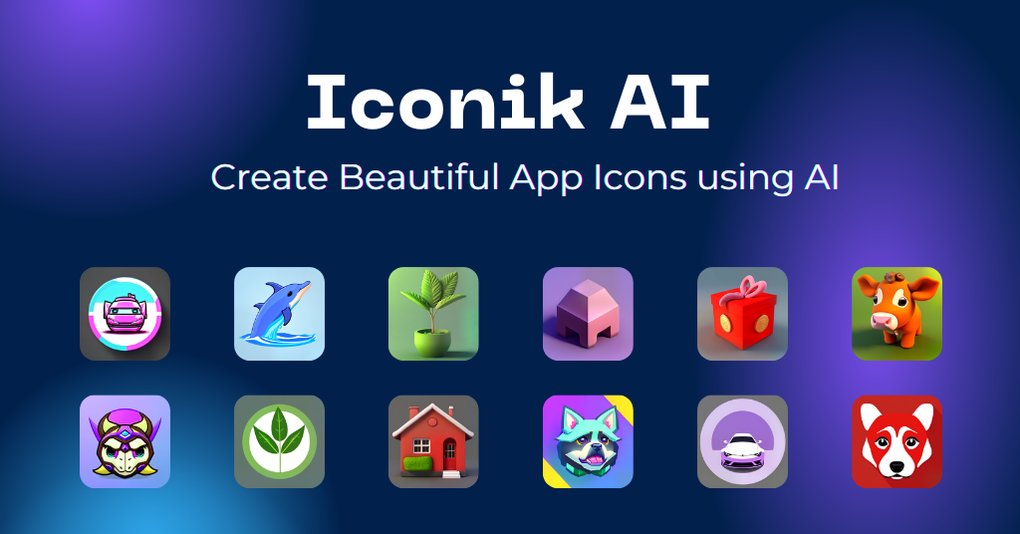
One of the standout features of Iconik AI is its ability to generate icons across a wide range of artistic styles. From minimalist and sleek to whimsical cartoon, retro, clay, metallic, and even watercolor, the platform offers a diverse palette of visual expressions. This flexibility ensures that your icons align perfectly with your brand’s personality and user experience goals. Moreover, every icon is designed to meet Apple’s Human Interface Guidelines and Google’s Material Design standards, ensuring seamless integration into your app’s interface.
What makes Iconik AI truly exceptional is its commitment to accessibility and privacy. The free forever plan allows users to generate an unlimited number of icons—perfect for prototyping, testing, or building a library of assets. While the free tier doesn’t include downloads, it’s ideal for previewing and validating concepts.
For those ready to use their icons in production, a simple pay-per-download model ensures affordability without hidden fees. All generated content is protected under user copyright, enabling full commercial usage. With end-to-end encryption and secure data handling, Iconik AI prioritizes user privacy, making it a trusted choice for both individual creators and enterprise teams.
Key Features of Iconik AI: What Makes It a Game-Changer?
Iconik AI isn’t just another icon generator—it’s a comprehensive design assistant powered by intelligent algorithms. The platform’s core strength lies in its ability to transform simple text prompts into visually rich, scalable vector icons. Here’s a breakdown of the standout features that set it apart:
- AI-Powered Design Generation – Input keywords like “cloud storage,” “music player,” or “eco-friendly,” and Iconik AI instantly creates multiple design variations based on context and style.
- Style Variety – Choose from 7 distinct design styles: Minimalist, Clay, Metallic, Retro, Cartoon, Watercolor, and Elegant. Each style adapts to your project’s tone and audience.
- Platform-Compliant Output – Icons are automatically optimized for iOS, Android, and web, ensuring pixel-perfect rendering across devices and screen densities.
- Unlimited Free Generations – The free forever plan allows unlimited icon creation, making it ideal for brainstorming, prototyping, and rapid iteration.
- Commercial Use Rights – Users retain full copyright on generated icons, enabling use in apps, websites, marketing materials, and commercial products.
- Privacy-First Architecture – All user data and designs are encrypted and never stored beyond the session, ensuring complete confidentiality.
- Easy Export & Integration – Download icons in PNG, SVG, and WebP formats, with support for transparent backgrounds and high-resolution outputs.
Another major advantage is the tool’s seamless workflow. After entering a prompt, users can refine the output using filters like color schemes, icon size, and symmetry. The AI learns from user preferences over time, improving future suggestions.
This adaptive intelligence makes Iconik AI not just a one-time tool, but a growing design partner. For developers, the ability to generate icons directly from feature descriptions streamlines the development cycle. Designers can use it to quickly explore concepts before diving into detailed mockups.
Whether you’re a solo developer or part of a creative team, Iconik AI enhances productivity and creativity without sacrificing quality or compliance.
How to Use Iconik AI: Step-by-Step Guide for Beginners
Getting started with Iconik AI is simple and requires no technical or design background. Here’s a step-by-step guide to help you create your first custom icon in under a minute:
- Visit the Website – Go to iconik.ai and sign up for a free account. The registration process takes less than 30 seconds and requires only an email address.
- Enter Your Prompt – In the input box, type a clear description of the icon you want. For example, “a green leaf with a heart inside for a sustainable app” or “a futuristic spaceship for a sci-fi game.” The more specific, the better the AI will perform.
- Choose a Style – Select from the available styles: Minimalist, Clay, Metallic, Retro, Cartoon, Watercolor, or Elegant. You can also combine styles for hybrid designs.
- Generate & Preview – Click “Generate,” and within seconds, Iconik AI delivers 3–5 unique icon variations. Preview each one, adjust settings if needed, and select your favorite.
- Download Your Icon – Once satisfied, click “Download.” The free plan lets you view icons but not download them. To download, you’ll need to purchase a single download credit or subscribe to a plan.
For advanced users, Iconik AI offers customization options such as adjusting icon size (16px to 512px), selecting color palettes, and enabling transparency. The interface is clean and intuitive, with real-time previews and responsive design. There’s no learning curve—just input, generate, and go. The tool is fully web-based, so you don’t need to install any software. It works seamlessly on Windows, Mac, Android, and iOS devices through modern browsers like Chrome, Safari, and Firefox.
Additionally, the platform integrates well with design workflows. You can copy icon URLs, embed them in Figma or Adobe XD projects, or use them directly in web development. The export formats (PNG, SVG, WebP) ensure compatibility across platforms. Whether you’re designing a mobile app icon, a website favicon, or a dashboard UI element, Iconik AI delivers professional results instantly.
Compatibility & System Requirements
Iconik AI is a cloud-based web application, meaning it runs entirely in your browser and requires no installation. This makes it accessible from any device with an internet connection and a modern web browser. The tool is fully compatible with:
- Operating Systems: Windows 10+, macOS 11+, Android 8+, iOS 14+
- Browsers: Google Chrome, Mozilla Firefox, Apple Safari, Microsoft Edge
- Device Types: Desktops, laptops, tablets, and smartphones
There are no specific hardware requirements—your device just needs a stable internet connection and a screen resolution of at least 1024x768 for optimal viewing. The platform is optimized for both high-speed and low-bandwidth environments, ensuring fast load times even on slower connections.
Since Iconik AI operates in the cloud, there’s no need to worry about software updates. The development team regularly rolls out new features, style improvements, and security patches automatically. Users always have access to the latest version without manual intervention. This is particularly beneficial for teams that rely on consistent tool performance across multiple devices and team members.
For enterprise users, the platform supports SSO (Single Sign-On) and admin controls for team management. The privacy-focused architecture ensures that sensitive design concepts remain confidential. With no local data storage, your designs are never exposed to third parties or vulnerable to device theft.
Pros and Cons: Is Iconik AI Right for You?
Pros
- Unlimited icon generation with free forever plan
- Supports multiple design styles and customization options
- Complies with Apple and Google design guidelines
- Full commercial usage rights and user copyright
- Secure, privacy-first design with encrypted data handling
- Web-based—no installation or updates needed
- Fast, intuitive interface suitable for non-designers
- Multiple export formats for web, mobile, and print
Cons
- Free plan does not allow downloads (only previews)
- Advanced features require paid credits or subscription
- AI may occasionally misinterpret abstract or complex prompts
- Limited control over individual design elements (e.g., exact line thickness)
- Dependent on internet connection for full functionality
Frequently Asked Questions (FAQ)
Is Iconik AI free to use?
Yes, Iconik AI offers a free forever plan that allows unlimited icon generation. However, downloads are restricted to paid plans or individual credits. This makes it ideal for testing, prototyping, and exploring design ideas without cost.
Can I use icons generated by Iconik AI for commercial projects?
Absolutely. All icons created with Iconik AI are owned by the user. You have full commercial rights to use them in apps, websites, marketing materials, and products without attribution or licensing fees.
Does Iconik AI support iOS and Android app icon standards?
Yes, Iconik AI automatically generates icons that comply with Apple’s Human Interface Guidelines and Google’s Material Design specifications. This ensures your icons look perfect on both platforms.
How secure is my data on Iconik AI?
Iconik AI uses industry-standard encryption (SSL/TLS) and does not store user data or designs beyond the session. Your designs remain private and are never shared with third parties.
Can I use Iconik AI on my mobile device?
Yes, Iconik AI is fully responsive and works on Android and iOS devices through any modern browser. You can generate and preview icons on your smartphone or tablet.
Final Verdict: Why You Should Download Iconik AI Today
Iconik AI is more than just a tool—it’s a creative accelerator for developers, designers, and entrepreneurs. Its blend of artificial intelligence, user-friendly design, and strict privacy standards makes it one of the most reliable and accessible icon generation platforms available. Whether you’re building a startup app, designing a personal project, or streamlining your workflow, Iconik AI delivers professional results with minimal effort.
With unlimited free generation, commercial usage rights, and cross-platform compatibility, it’s a no-brainer for anyone needing high-quality icons quickly. While the free plan doesn’t include downloads, the value of previewing and iterating on designs is immense. Once you’re ready to use your icons in production, the pay-per-download model is transparent and affordable.
Download Iconik AI today and transform your idea into a visual reality in seconds. No design skills needed. No complex software. Just creativity, powered by AI.



.png)



